Login details can be changed by:
- The person themself
- A guardian linked to the Suomisport account
- Suomisport Customer Support
1) The person changes their own details
- Sign in using the login details currently saved to your account (email or phone number).
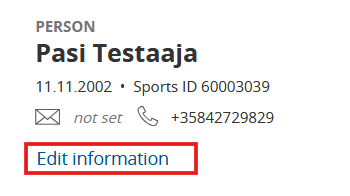
- After signing in, click the “Edit information” button.
- On the edit page, you can change your account to a contact detail that does not already existin the service.
A phone number or email address can be linked to only one Suomisport account.
- After changing the contact detail, you must verify it. After saving, you will receive a 6‑digit code at the contact detail you changed (email or phone). Enter this code in the field that appears.
- After verification, the contact detail is updated.
Image: Edit information button
2) A guardian linked to the Suomisport account
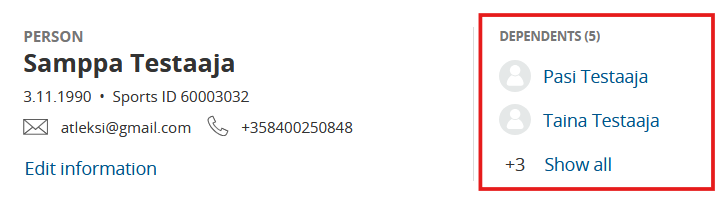
- The guardian first signs in to their own Suomisport account, then switches to the dependent’s account.
- In the dependent’s account, click Edit information.
- On the edit page, you can change the account to a contact detail that does not already existin the service.
A phone number or email address can be linked to only one Suomisport account.
- After changing the contact detail, you must verify it. After saving, you will receive a 6‑digit code at the contact detail you changed. Enter this code in the field that appears.
- After verification, the contact detail is updated.
Switching to the dependent’s account
3) Suomisport Customer Support
If the person themself or the guardian does not have access to the current login details, please contact Suomisport Customer Support, who can update the account details:
Was this article helpful?
That’s Great!
Thank you for your feedback
Sorry! We couldn't be helpful
Thank you for your feedback
Feedback sent
We appreciate your effort and will try to fix the article