In Suomisport, children's matters are managed by their guardians. Every child has their own account in the service, which is linked to at least one guardian's account. Guardians can manage the child's matters through their own account. It is also possible to add a second guardian to the child's account. This article explains how to create a second guardian link.
For security reasons, a second guardian link can only be added by either the first guardian linked to the child or by Suomisport Customer Service.
The First Guardian Adds a Second Guardian:
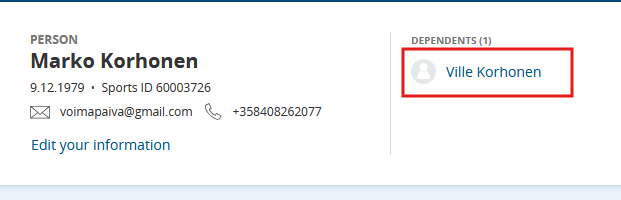
1. Sign in to your account.2. Open the dependant's account by clicking the dependant's name
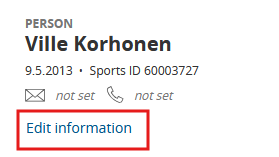
3. Go to the dependant's profile and select Edit information.
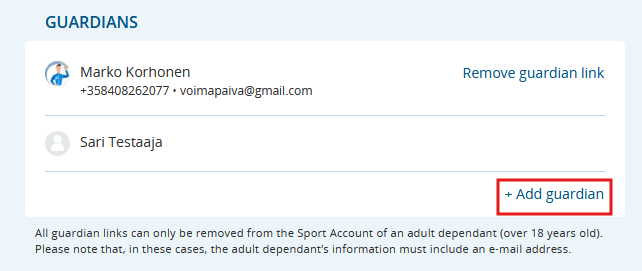
4. Click Add guardian.
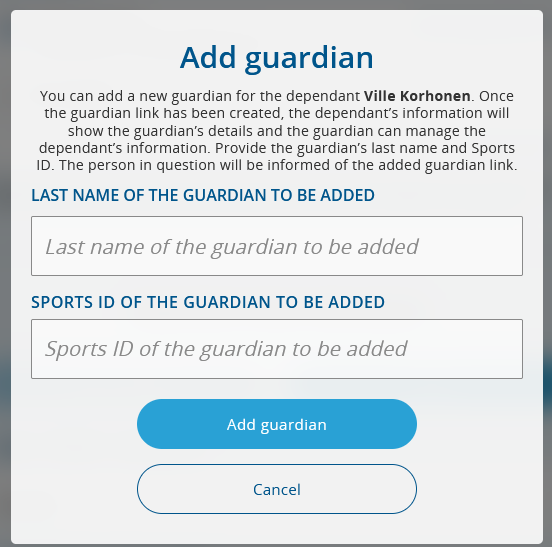
5. Add the guardian using their last name and Sport ID.
Suomisport Customer Service Creates the Link:
- The guardian who is already linked to the dependant contacts Suomisport Customer Service.
- Provide Customer Service with:
- The dependant's Sport ID (or the dependant's name and date of birth), and
- The Sportti ID of the guardian to be added.
- Customer Service will create the guardian link.
Was this article helpful?
That’s Great!
Thank you for your feedback
Sorry! We couldn't be helpful
Thank you for your feedback
Feedback sent
We appreciate your effort and will try to fix the article