This article explains how to register for, invite to, and join a club’s groups and teams.
Members can join/register for a group/team either via a direct group join link or via the group’s registration page.
Note: The group’s direct group join link and the link to registration page are not the same.
Read below which method suits different situations.
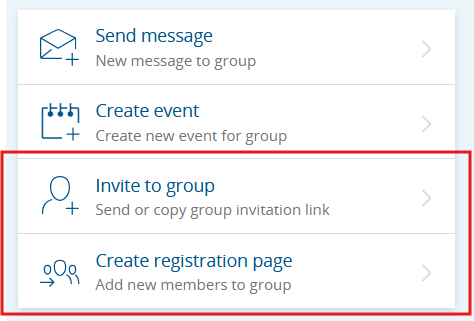
Image: “Invite to group” link and “Create registration page” buttons
Create a Registration Page & Promote the Group in Sporttihaku
A group registration page is a good and easy way to collect registrations for a new group/team, or to promote the group at the start of a new season.
Compared to the direct join link, a registration page is more visual and concrete as a way to join a group. Registration pages marked public will also be discoverable in Sporttihaku.
On the registration page, you can add the club logo, write a description of the group’s activities, and include a contact person for questions.
You can also restrict registrations (e.g., by club membership, age, or gender) or set a maximum number of participants. You can ask additional questions from registrants and add terms to accept.
You can add a registration fee that must be paid at the time of registration. Collecting the fee at this stage speeds up cash flow and may reduce the need to collect fees later within the group using the Season Fee tool.
You can also copy old registration pages to use as a template for a new one, which makes it easier to create new pages when the season changes.
- Create a new registration page from the group’s home page via Create registration page.
- To use an old registration page as a template, go to the Registration Pages tab and, as shown in the image below, click the menu button.
- You can copy any old registration page to any active group.
Image: Copying a registration page to use as a template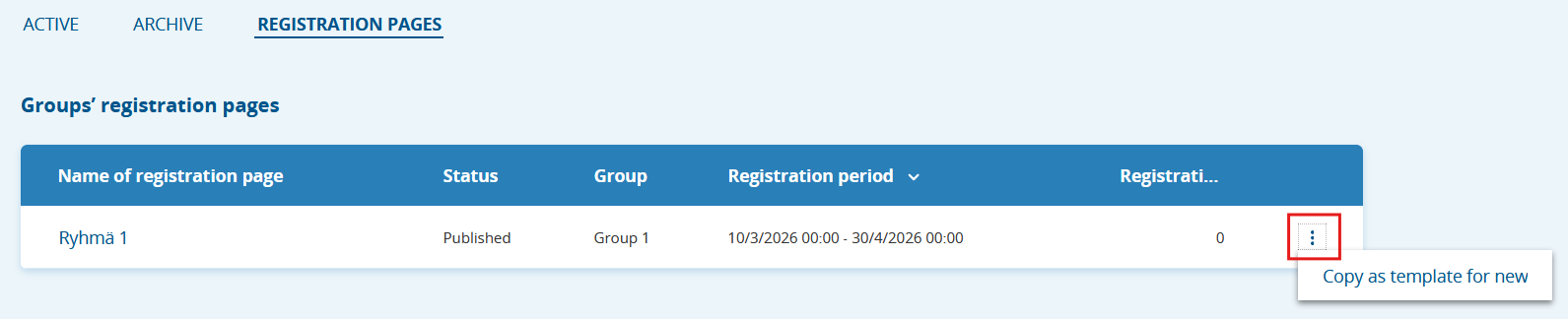
“Invite to Group” Feature
The Invite to group link is a direct link that lets people register for the group. It’s a good way to invite, for example, coaches for a group or a group whose people are already established, such as a racing group or team.
- You can find the group’s invite link on the group home page under "Invite to group".
- Copy the invite link and share it across your channels.
- The link is private and not discoverable via Sporttihaku.
Watch the tutorial video on inviting to a group (in finnish):
Was this article helpful?
That’s Great!
Thank you for your feedback
Sorry! We couldn't be helpful
Thank you for your feedback
Feedback sent
We appreciate your effort and will try to fix the article