This article explains where to find your club’s key reports related to groups and teams.
The current group reports are “Group personal data” and “Group attendance data.”
Group reports—like all other reports on the Reports page (Extended member data, Group personal data, Group attendance data, Season & Membership Fees)—are found under Administration tools.
The on‑screen report view shows only part of the data. At the moment, the easiest way to analyze reports is to export them (e.g., to Excel).
Reports are still a rapidly evolving area of the service. The currently visible reports are first‑phase versions. The goal is that, in the future, reports will be fully usable without exporting them out of the service.
Please always process data in accordance with data protection regulations.
How to find the group reports
- From your club home page, go to Administration tools → Reports.
- Scroll down until you find the reports named “Group personal data” or “Group attendance data.”
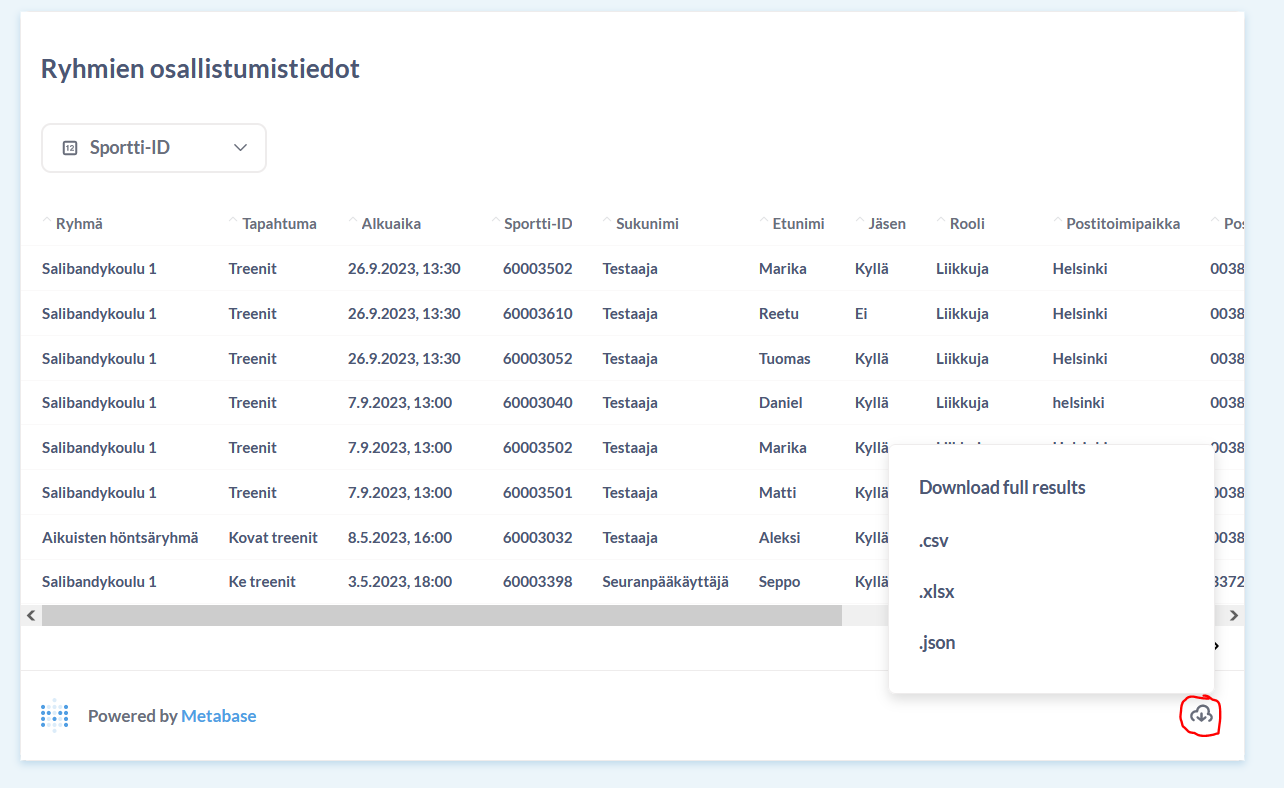
- Export the report for closer analysis by clicking the cloud icon in the right corner of the report view and selecting your preferred file format.
What data do the group reports include?
- Group personal data: Personal details of the people in groups and their guardians, such as email addresses.
- Group attendance data: Attendance records for all of the club’s groups, listed by attendance entry.
The report does not include participants’ registration entries (sign‑ups).
Was this article helpful?
That’s Great!
Thank you for your feedback
Sorry! We couldn't be helpful
Thank you for your feedback
Feedback sent
We appreciate your effort and will try to fix the article