This article explains how club members join member classes and how the club processes members’ join requests.
Suomisport implements association law–compliant membership management from applying and accepting all the way to resignation. Membership is applied for in a member class that complies with the club’s rules, so please create your club’s member classes in the service first.
Here are the instructions for creating member classes >
Each club member applies for club membership themselves. A club user cannot add people as members, and an old membership register cannot be imported into the system. This benefits the club member and increases transparency in club operations.
The club can invite people to become members in two ways:
1. Direct join link for a member class
- Each member class has its own join link; by clicking it, a person applies for club membership.
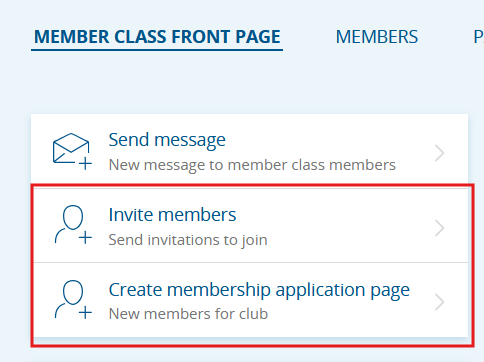
- You can find the join link on the member class home page under Invite members.
- Copy the link and share it on the club’s website, social media channels, and newsletters.
2. Membership application page
- Create a marketing-style membership application page under a member class.
- When applying for membership, the club can require the applicant to accept the club’s rules, ask additional questions related to the membership, and require acceptance of other terms.
- Application pages set to public appear in Sporttihaku
Image: Member class home page with “Invite members” and “Create membership application page” buttons
Processing join requests
- Member join requests must be processed per member class in the service.
- The club receives an email to the main club email address at 12:00 if new join requests have been received during the previous 24 hours.
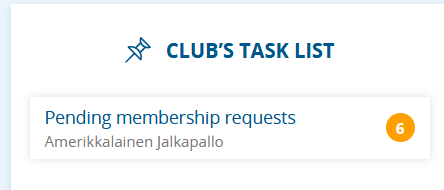
- A club user can see new join requests on the club home page in the club task list, or on the Member Classes page.
- The club can either accept or reject a member’s join request.
- An automatic notification about acceptance or rejection is sent to the person via the Suomisport mobile app and by email. If the member is a child, the message also goes to their guardian.
- An automatic notification about acceptance or rejection is sent to the person via the Suomisport mobile app and by email. If the member is a child, the message also goes to their guardian.
- After acceptance, the member immediately receives their membership card in their Suomisport account (best found in the Suomisport app).
- Club can assign membership fees to approved members, or set fees to be automatically assigned to people who join during the membership season.
Image: Pending member requests in the club’s task list in Suomisport
Was this article helpful?
That’s Great!
Thank you for your feedback
Sorry! We couldn't be helpful
Thank you for your feedback
Feedback sent
We appreciate your effort and will try to fix the article