This article explains where to find your club's reports and what information is available in each report.
DIRECT LINKS
- Where can I find reports?
- Extended Member Information
- Group Member Information
- Season and Membership Fees
- Group Attendance Information
- Downloading Reports
- Important Notes About Reports
- Anonymised Persons in Reports
Where can I find reports?
All club reports can be found under Administration Tools → Reports.
The following reports are currently available:
- Extended Member Information
- Group Member Information
- Group Attendance Information
- Season and Membership Fees
Scroll down the Reports page to find the report you need.
Extended Member Information
The Extended Member Information report contains information about club members, including:
- contact information
- membership start date
- age
- guardian contact information
This report is particularly useful for reviewing membership data and analysing member-related information.
Group Member Information
The Group Member Information report contains information about people assigned to groups and their guardians.
The report includes, for example:
- participant contact details
- guardian contact details
- group-specific personal information
This report is useful for reviewing participant and guardian information for club groups.
Season and Membership Fees
The Season and Membership Fees report provides an overview of the club's payments in one place.
You can review:
- paid fees
- unpaid fees
- membership fees
- season fees
This report helps track payment status and review club fees.s
Group Attendance Information
The Group Attendance Information report contains attendance records for club groups on a session-by-session basis.
You can review:
- attendance counts
- attendance markings in different groups
Please note that self-recorded attendance entries made by participants are not included in this report.
Downloading Reports
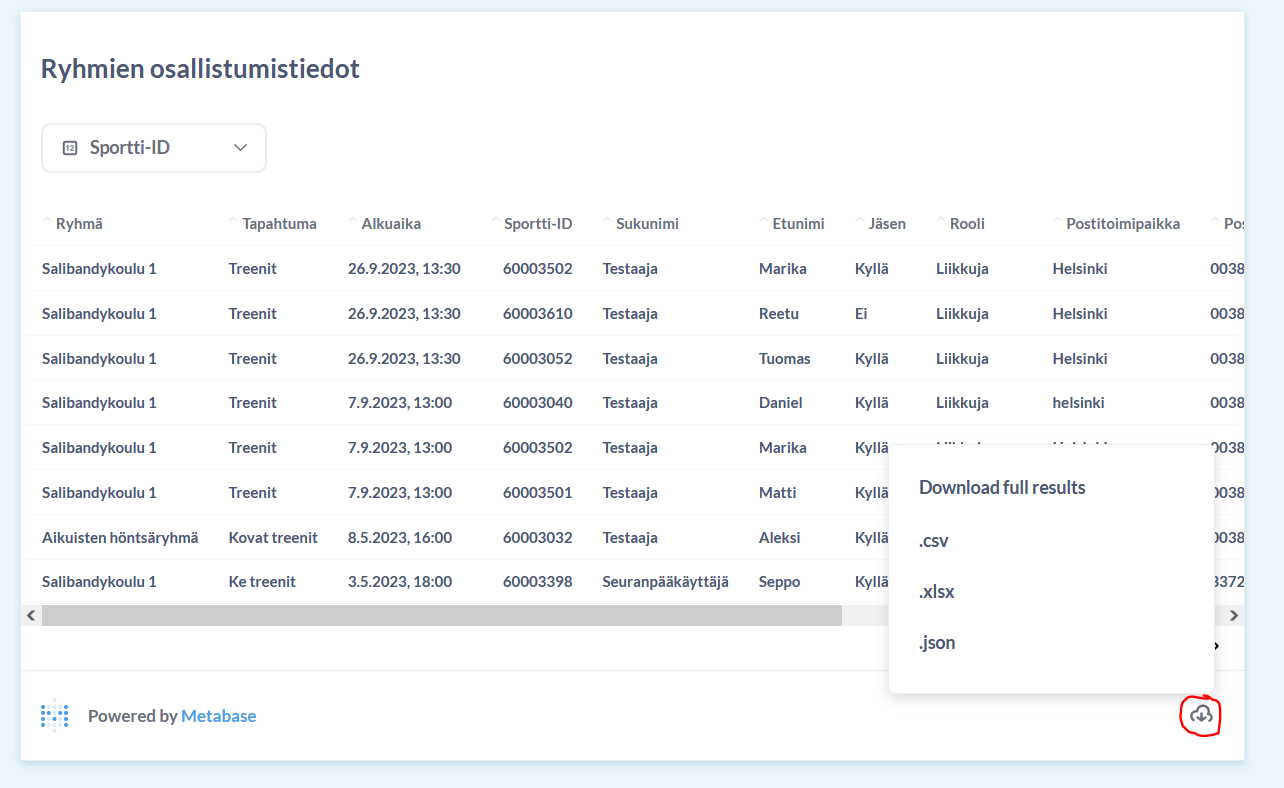
The report preview only displays part of the available data. For detailed analysis, we recommend downloading the report, for example in Excel format.
To download a report:
- Open the desired report.
- Click the cloud icon in the report view.
- Select the preferred file format.
Image: Group Attendance Information report and the report download button.
Important Notes About Reports
- Reports are visible to all club users.
- Reports are updated once per day.
- The report view only displays part of the available data, so detailed analysis should be done using the downloaded file.
- Personal data included in reports must always be processed in accordance with applicable data protection regulations.
Anonymised Persons in Reports
Historical information about former members remains available in reports, but personal information is anonymised to ensure data protection.
An anonymised person appears as Deleted instead of their personal information.
This allows clubs to use reports for historical analyses of activities, membership figures and participation statistics even after a person has left the club.
What information is anonymised?
When a person is anonymised, the following information is removed or replaced:
| Information | Change |
|---|---|
| Sportti ID | Replaced with "Deleted" |
| First name | Replaced with "Deleted" |
| Last name | Replaced with "Deleted" |
| Email address | Removed |
| Phone number | Removed |
| Address information | Removed |
| Guardian information | Removed |
When is a person anonymised?
A person is anonymised only when they no longer have an active membership or active group membership anywhere within the same club.
If the person still has an active membership or active group membership in the club, their information will remain visible in reports, even if they have previous memberships or group participations that have already ended.
What information is retained after anonymisation?
Reports retain information that allows the club to analyse its activities statistically without identifying an individual.
The following information is retained:
- membership start and end dates
- gender
- municipality
- year of birth
- month of birth
Please note that the person's date of birth is modified during anonymisation so that the day is always set to the 15th of the month.
Was this article helpful?
That’s Great!
Thank you for your feedback
Sorry! We couldn't be helpful
Thank you for your feedback
Feedback sent
We appreciate your effort and will try to fix the article