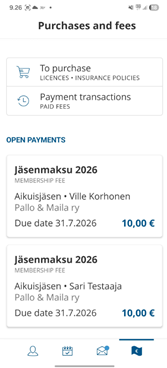
The payments assigned to you by the club can be found and paid through your Suomisport account under the “Payments” tab.
The easiest way to access your Suomisport account is by downloading the Suomisport app on your phone or logging in at https://www.suomisport.fi/.
On the Payments tab, you can find pending, open, and paid payments. Suomisport will notify you about new and due payments via app notifications and by email to the address linked to your Sportti account.
You must be a member of the club (your membership must be approved by the club) or be registered in a club group in order for the club to assign a payment to you / for you to be able to pay the club’s fees.
Paying a Fee
You can pay the club’s fee directly to the club using your preferred payment method.
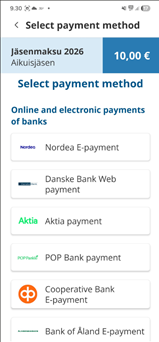
In Suomisport, available payment methods include online banking, debit and credit cards, and mobile payment options such as MobilePay.
You can also choose invoice or installment payment options.
The payment method selection in Suomisport is provided by Svea Payments.
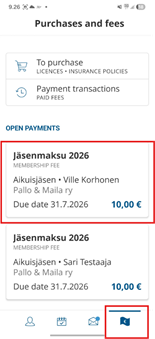
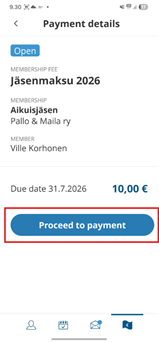
Go to the Payments page → click the payment you want to pay → select a payment method.
Viewing Paid Payments
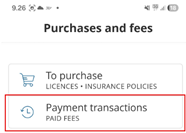
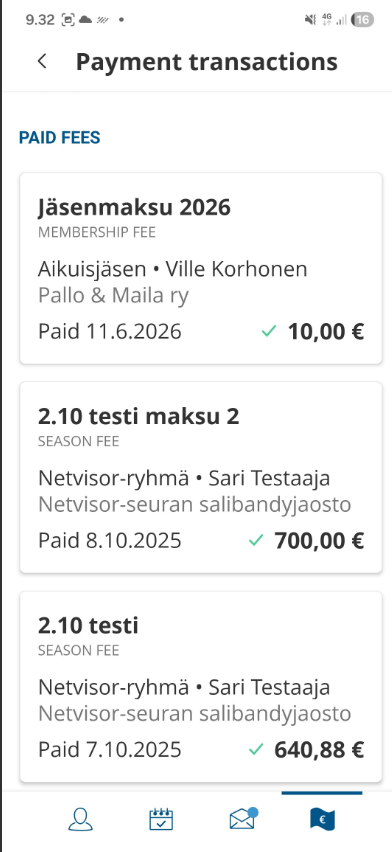
You can browse completed payments on the Paid page, and by clicking a payment you can view more detailed information.
Note: When a payment for a dependent has been paid, it will also be removed from the open payments of the other guardian, so the payment cannot be made twice by mistake.
Was this article helpful?
That’s Great!
Thank you for your feedback
Sorry! We couldn't be helpful
Thank you for your feedback
Feedback sent
We appreciate your effort and will try to fix the article